Item Upgrade System
Raise equipment to +8, improve its existing attributes and unlock two extra Attack or Defense stat slots.
1. Open Item Upgrade
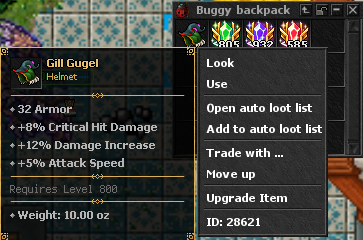
Hold Ctrl and right-click an eligible equipment item, then choose Upgrade Item from the context menu.
- The item may be in your inventory, an open container or an equipment slot.
- Only supported equipment types can be upgraded.
- The module reads the exact item, its current level, rarity, original attributes and available slots.
2. Read the Upgrade Module
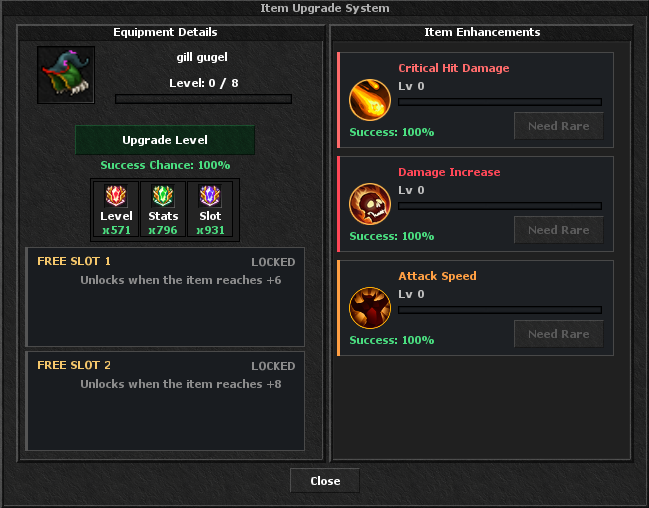
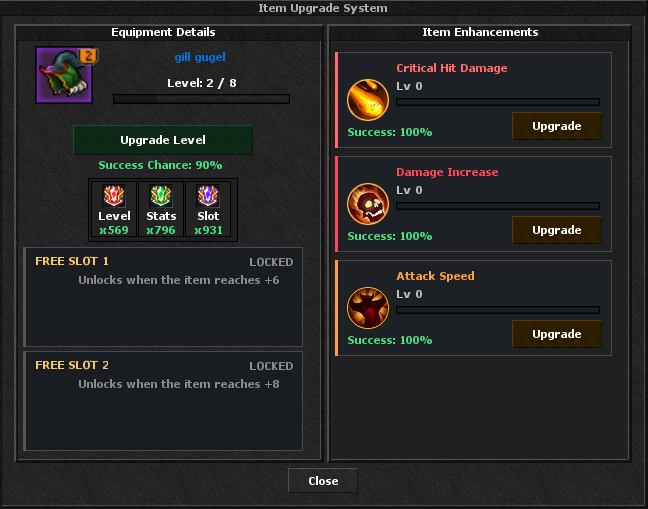
Equipment Details shows the selected item and its progress from 0 to 8. The three counters show how many Level, Stats and Slot stones you own.
- Upgrade Level attempts the next item level.
- Item Enhancements lists attributes already built into the item.
- The button beside an attribute becomes available when the item's rarity supports another stat level.
- Free Slot 1 unlocks at +6 and Free Slot 2 unlocks at +8.
3. Item Levels, Chances and Rarity
Every attempt consumes one Upgrade Level stone. A failed roll leaves the item at its current level; it does not destroy or downgrade the item.
Starting Levels
100% success for both levels. The base rarity remains unchanged.
First Rarity Step
Success chances are 90%, 80% and 70%. At +3 the item moves one rarity above its original rarity.
First Free Slot
Success chances are 55% and 40%. At +6 the item gains another rarity step and unlocks Free Slot 1.
Maximum Level
25% success. The item gains its third rarity step and unlocks Free Slot 2.
4. Upgrade Existing Attributes
Rarity controls how far each supported attribute can be enhanced: Rare allows level 1, Epic level 2, Legendary level 3, Mythic level 4 and Nitro level 5. Common items cannot enhance stats until their rarity rises.
- Press Upgrade beside an existing attribute.
- Each successful click consumes one Upgrade Stats stone and adds one stat level.
- Original item attributes do not consume a Free Slot.
- The available attributes depend on whether the item is a helmet, armor, legs, boots, weapon, shield, accessory, backpack, ship, ammo or strike item.
5. Roll a Free Attribute Slot
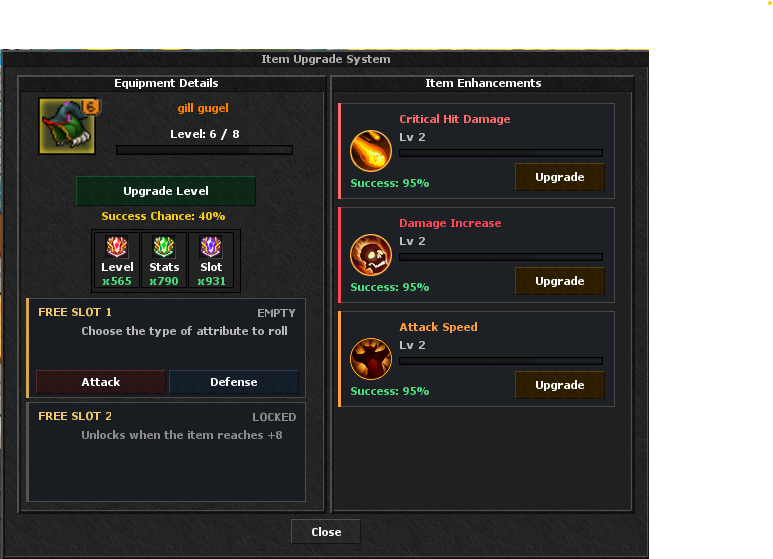
When an item reaches +6, Free Slot 1 opens. At +8, Free Slot 2 opens. Choose Attack or Defense and the server rolls a valid stat and value for that item.
- Rolling or rerolling consumes one Roll Slot stone.
- The rolled value is based on the item's configured Shell Tier.
- The same stat cannot occupy both Free Slots.
- Weapons roll offensive pools; armor pieces roll defensive pools.
- A reroll replaces the selected slot's previous result.
6. Upgrade Stones and Their Uses

Upgrade Level
Attempts the next equipment level from 0 through +8. One stone is consumed on every attempt.

Upgrade Stats
Adds one level to a supported existing attribute, up to the cap allowed by the item's current rarity.

Roll Slot
Adds, rolls or rerolls an attribute inside an unlocked Free Slot.
7. Where Upgrade Stones Come From
Upgrade Roll
The Upgrade Roll can reward all three stones. Higher roll rarity improves their quantities and the chance of receiving Upgrade Level stones.
Crafting System
Craft Upgrade Level with Broken Gladiator Shields and a green material; Upgrade Stats with Broken Gladiator Shields; or Roll Slot with Broken Gladiator Shields and a mythic material. Each recipe also costs Xnitro Tokens.
Game Store
Upgrade Level, Upgrade Stats and Roll Slot are available separately in the Craft Tools category for Premium Points or Event Tokens.
Battle Pass & Activities
Upgrade Rolls and stones may also appear in Battle Pass tiers, events and other configured server rewards. Check each reward preview before claiming.
Upgrade Tips
- Check the displayed chance before spending a Level stone, especially from +6 onward.
- Raise rarity first when an attribute button says that a higher rarity is required.
- Existing attributes and rolled Free Slot attributes are separate: use Upgrade Stats for the first and Roll Slot for the second.
- Choose the Attack or Defense pool that complements your build before rolling a Free Slot.
- The item is safe after a failed level attempt, but the used stone is not returned.