Hunt Mission System
Start timed missions from the statue inside each hunt, follow live progress in Trackers and claim the displayed rewards after completing the objective.
1. Open the Hunt Mission Statue
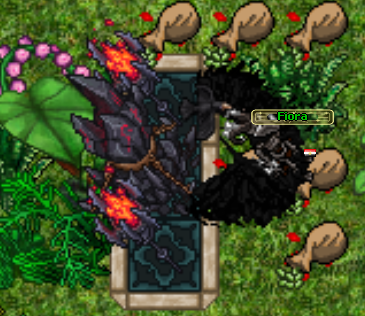
Every supported hunt contains a mission statue or board. Use it to open the Mission Hub configured for that hunt.
- Each hunt has its own mission list and matching monster or item objectives.
- The left side shows available missions, current progress and a short reward summary.
- Select a mission to view its description, required level, full objective and reward icons.
2. Select and Activate a Mission
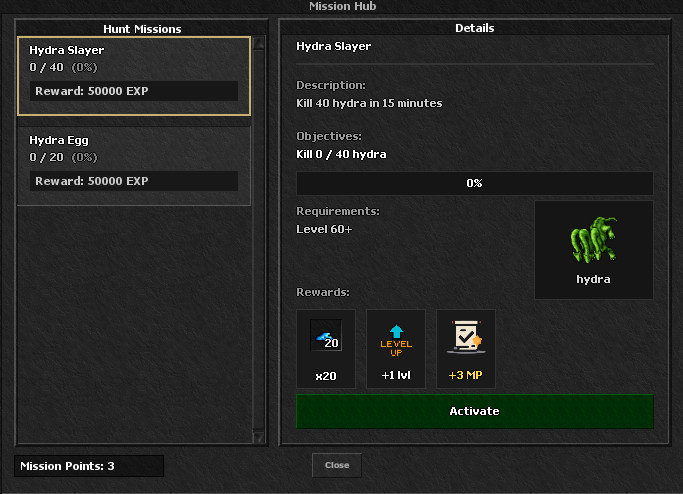
Choose a mission and press Activate. The timer begins immediately and the mission is placed in an available tracker slot.
- You can have a maximum of two active Hunt Missions at the same time.
- Kill missions count the configured monster kills.
- Collect missions count the required mission items in your possession.
- Rewards are shown before activation and can include items, levels, Attribute Points and Mission Points.
- Mission Points are a permanent currency used as an access requirement by some Hunts and Quests.
3. Follow the Mission in Trackers
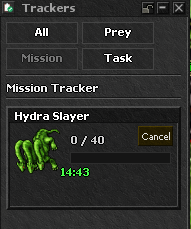
After activation, open Trackers and select the Mission tab. The Mission Tracker updates as you hunt.
- The card shows the target, current progress and required total.
- The countdown shows how much time remains.
- Progress messages are also sent while kills or collection totals increase.
- The Cancel button deactivates the selected mission and frees its slot.
4. Complete Before Time and Claim Later
Complete the Objective
Reach the required kill or item total before the countdown ends. The server records the exact completion moment and changes the mission to Completed.
No Claim Expiry
A mission completed within its time limit cannot expire while waiting for its reward. It remains completed through logout, death, AFK time and the original timer ending.
Claim Reward
Return to that hunt's mission statue, select the completed mission and press Claim Reward. Claiming gives the displayed rewards, marks the mission claimed and clears its Tracker slot.
Failure and Cancel Rules
- If a timed mission reaches zero before completion, it fails, leaves the active slot and its timed progress is reset.
- Cancelling an incomplete timed mission also resets its progress and start time.
- A completed mission has priority over expiry and remains ready to claim.
- A claimed mission cannot be claimed a second time.